Details

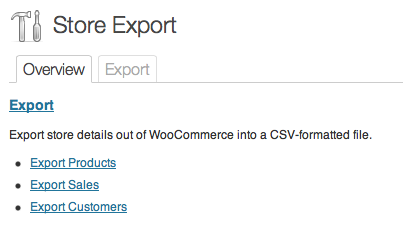
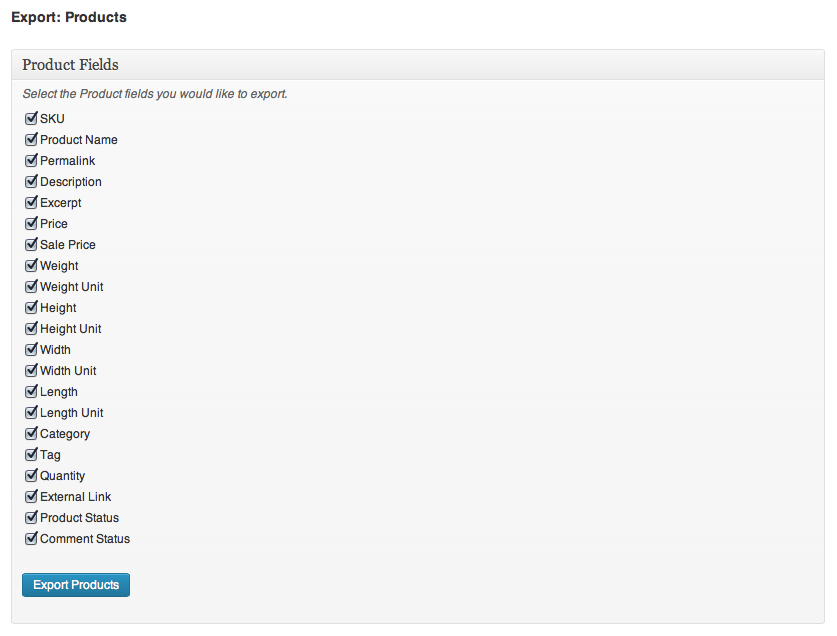
Exporter allows you to export the following store details.

  • Products
  • Categories
  • Coupons

Unlock additional business features of this free Plugin with Store Exporter Deluxe.

Compatibility

  • Jigoshop
  • WooCommerce
  • WP e-Commerce 3.7 ready (up to 3.7.8)
  • WP e-Commerce 3.8 ready (up to 3.8)

Updates

The latest release can be downloaded from your My Account page.

Documentation

Looking for support, a copy of the readme, Plugin updates, Ideas or usage instructions? Check out our Documentation for Store Exporter.

121 thoughts on “Store Exporter

  1. Hey! Does this plugin work on a multisite site? I installed the lite version and it comes up with an error when I click “export” from the plugins page. The error is “You do not have administrator privileges for this dashboard” even though I am logged in as super admin. I also tried to create an admin for the site and log in and do it but same error message. Any Ideas?

    • Hi james, thanks for raising this. Store Exporter is not compatible with multisite environments, if you can get in touch via Contact I would be happy to work with you directly to add support for this in a future Plugin update.

  2. I bought this plugin expecting that it would give me a list of exported products and product quantities. I really need this so that I can adjust inventory levels in our accounting software automatically. Is there any chance this could be added? I believe I would need the addition of at least SKU, variation description (and perhaps ID), qty ordered, and perhaps cost. I know this is more difficult being an undefined number of products, but it could be done either with multiple rows per order or with a character-separated list per entry.
    Also, I use Spanish characters and your present Store exporter plugin does not render the accents– instead, it gives gibberish.

  3. For some reason the categories are not pulling in to the export, I’m running the latest versions of everything if that helps.

  4. Hi I can’t get permissions to work.
    uploaded pdf set permissions to subscriber.
    when logged out of wordpress can still download document.
    Is there something I’m supposed to add to the generated shortcode?
    also I reset a whole category to subscriber but it didn’t go through and change all the documents.

    • opps sorry pasted the wrong text, ignore above message!

      Was wondering if you could give some pointers as to where in the code I could add additional fields to export?

      • Hi cassandra, I’ve added some new hooks/filters to the latest Plugin update and will add a sample to the Usage document for this Plugin demonstrating this. I expect this to be ready by Monday.

  5. I purchased Jigoshop Product Importer Deluxe and then installed Exporter 1.2.4 so I could have a template to use to start importing everything.

    Unfortunately I am getting the following error when trying to start the export in wordpress. Not sure what is wrong or what URL that is trying to refer to.

    Any idea how to fix this?

    “This webpage is not found
    No webpage was found for the web address: http://photos.goldeditions.com/wp-admin/admin.php?page=jigo_ce
    Error 6 (net::ERR_FILE_NOT_FOUND): The file or directory could not be found. “

        • Hi bagow, this is a common error that can look like this error too:

          “PHP Fatal error: Maximum execution time of 30 seconds exceeded…”

          Your WordPress site is either hosted on a server with Safe Mode enabled for PHP or a server timeout is being imposed; which we already do our very best to override.

          • safe_mode outdated and it is recommended not to use the latest versions of php. And I do not use it on my server.

            I increased the limits in your script

            $ timeout = 60000;

            Removed the check for safe_mode. I increased the limit execution of scripts on the server. And it does not help.

            I have in store 6000 items. When I export categories and customers, all right.

            What else could be the problem?

            Sorry for my English.

            • Hi bagow, setting $timeout to 100000 won’t make a difference if the server is not allowing us to override the default timeout limits.

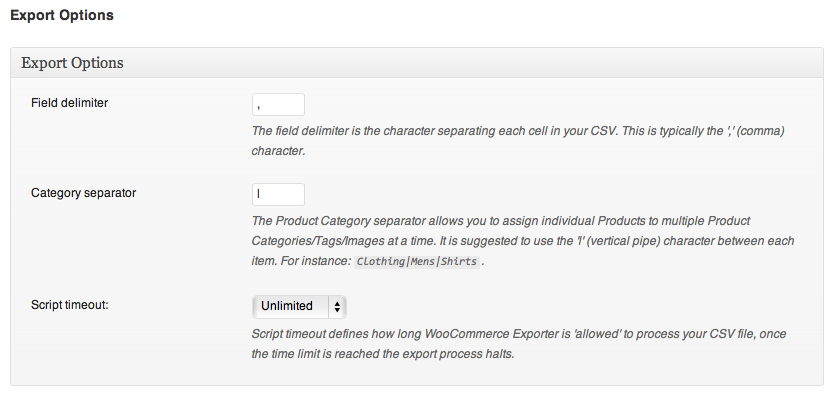
              Due to the large volume of SQL queries made when exporting Products it is common to get the above errors where we can’t override those server timeouts.

              What I will do however is add partial Product exporting as an option (e.g. export Products 0 – 500, then export 501 – 1000, etc.) as individual CSV files, this way we can get under the timeout limits by limiting the number of Products exported. I’ve added this to my Job queue and will get it into the next Plugin update. :)

  6. I just tried to export products form jigshop which is still in staging environment, but got an fatal error, see below??
    Regards, stephen

    Fatal error: Cannot use object of type stdClass as array in /home/hamel21/domains/opjacht-test.nl/public_html/mnu/wp-content/plugins/jigoshop-exporter/includes/functions.php on line 442

  7. I just installed the Jigo – Exporter, and I can’t seem to find where I initiate the exporting process. The instructions says go to “Open Jigoshop > Store Export from the WordPress Administration”. I don’t see where this menu is.

    Thanks!

  8. Installed 1.3.3, when I click on STORE EXPORT i get:

    Fatal error: Call to undefined function wpsc_ce_template_header() in /home/headsets/public_html/wp-content/plugins/wp-e-commerce-exporter/exporter.php on line 101

      • Thanks for your reply Mike – different line now:
        Fatal error: Call to undefined function wpsc_ce_template_header() in /home/headsets/public_html/wp-content/plugins/wp-e-commerce-exporter/exporter.php on line 124

        WP Version: 3.4.2
        Store Export: 1.3.7
        WP-Commerce: 3.8.9.2

        I noticed when I extracted the ZIP that the archive: wp-e-commerce-exporter packaged: Mon, 12 Nov 2012 21:47:53 +0000 – which is prior to your reply on the 19th.

    • Hi Jason, thanks for raising this, I’ll look into this once our urgent work is out of the way. It’s likely we’re linking to a wrong Product detail. I’ll patch this in the next Plugin update.

  9. I love this plugin!

    Is there any way to get it to export product attribute date? I populate an attribute field that I use to generate picking reports from.

    Thanks,

    Jason

  10. Hi Michael,

    Any chance to also export the product image links please?

    I’m trying to use this plugin to import products into Google Merchant.

    Cheers,

  11. I installed this plugin to export the product from our store to a CSV but the plugin is not showing that we have any products?

  12. Hey.

    I have had a few WooCommerce project over recent months and I am rather baffled at the lack of a comprehensive Exporter extension.

    From hours on the ol’ interwebs I can find Exporter (your plugin), Smart Manager and Order/Customer CSV Export from Woo themselves.

    All of these have positives but none do what I find clients want time and time again and that is real granular control over what data is either exported or exportable.

    Take for example I have a store selling t-shirts. I have a few hundred orders and want to export some of that data for whatever shopkeeping reason. Let’s say I want First Name, Last Name, Order id, T-shirt purchased and it’s corresponding variations e.g. large and blue.

    In this scenario the exported csv file would look something like this in Excel:

    First Name Last Name Order id Product Variation (size) Variation (color)
    Bob Smith #123 Retro T-shirt Large Blue

    And in addition, it would be great to be able to, for example, search for ‘Retro T-shirt’, ‘Blue’ and be able to export orders containing those variables.

    The closest I’ve found out of the available plugins is Smart Manager but it won’t let you choose which columns to export and even worse, doesn’t include any variation data, which is a disaster.

    I don’t know if you have used Gravity Forms but it has a fantastic export feature where you can choose exactly the form fields you want to export.

    http://www.gravityhelp.com/documentation/page/Import/Export http://www.gravityhelp.com/documentation/page/File:Export-entries.png

    I wish I had the developer skills to create something like this myself, as I think it would make a lot of people very happy.

    Anyway, I’d love to hear your thoughts on this as you’ve actually created an exporter plugin.

    Cheers,
    David

    • Hi David, thanks for your comment, I’ve added initial column export support for Products and plan to extend this feature to include Sales and other store details (e.g. Shipping rules, Tax rules, Discounts, etc.).

      I’ll be releasing the next Plugin update in a few days to update Products support and would be happy to work with you to lock down the requirements and formatting for Sales CSV exports.

      • Not sure if this is what you’re describing, but I’m looking to be able to export a list of customer names listed with the products they bought. Is this what you’re describing?

        We need to be able to export + print the list so that we can look up customers as they come in and give them the items they purchased.

          • Hi Michael – thanks for being so accommodating and interested in what your users want. I think that’s great!

            The table columns I’m looking to have in one exported file are:

            Customer Name | Products Purchased (from all of their transactions within a specified date range – if possible) | Product Add-ons (this is another plugin/extension I’m using, and it adds info into the order)

            So if a customer had multiple transactions within a date range it would be something like this:

            customer A | product 1 | product add-ons
            customer A | product 2 |
            customer A | product 3 |
            customer B | product 1 | product add-ons

            (only some of my products have add-ons)

            My explanations above might be totally unclear – just let me know if you need any clarifications or if you want to talk further about this. I’m subscribed to the replies on this page, but you can also email me at lauren[at]byoconsulting[dot]com

      • Hi Michael.

        I’d be happy to work with you on this.

        Feel free to email me david[at]sunstarcreative.com and let me know how I can help and how you want to move forward.

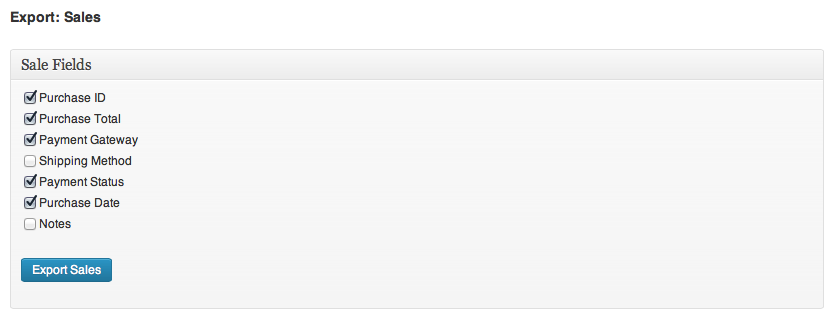
        • Hi Orlando, I’ve added Sales/Orders support in the 1.0.5 Plugin update available now, it’s pretty basic but I’d like to work with WooCommerce store owners to extend the available Sale/Order fields. Feel free to get in touch if you have any ideas of additional export columns for Sales/Orders.

Leave a Comment

Before you comment - Do you have a support request? If so, this is not the right place to post it. You should submit a support request here, instead.

Your email address will not be published. Required fields are marked *

You may use these HTML tags and attributes: <a href="" title=""> <abbr title=""> <acronym title=""> <b> <blockquote cite=""> <cite> <code> <del datetime=""> <em> <i> <q cite=""> <strike> <strong>

Store Exporter comes with a Quick Start document (readme.txt) to help with installing the Plugin. Additional support can be found from the Contact page or methods below.

Urgent Support

If you find yourself needing immediate support for your purchase use the Premium Support page or Live Support button.

Store Exporter Forum

If you have any problems, questions or suggestions please join the members discussion on our Store Exporter forum.